
- How To Install the Astra Theme
- System Requirement for Astra Theme
- What Is a Child Theme and How To Install It for Astra?
- Manually Install Astra via FTP
- How to Update Astra Theme Manually?
- Automatic Beta Updates for Astra
- Astra 4.2.0-beta.1 : Migrations & Backwards Compatibility
- Know More about Astra Beta Versions? How to Download and Use?
- How to Create a Multisite Network and Use Astra Child Theme On It
- Getting Started with Astra Pro Addon Plugin
- What is Astra Pro Add on?
- How to Install Astra Pro Plugin?
- How to Get License Key of Astra Pro?
- How to Activate Astra Pro Addon License?
- Getting error – The package could not be installed. The theme is missing the style.css stylesheet?
- Why Can’t I Access Astra Pro Features After Purchasing the Pro Version?
- Do Not See License Activation Form for Astra Pro Addon Plugin?
- How to Fix “Sorry, You Are Not Allowed To Access This Page” Error In Astra Pro
- How to Download Your Purchase Invoice
- How to Manage License on Store?
- How Do License Upgrades Work?
- How To Update Your Payment Method?
- How to Process Refund Requests?
- How to Apply For Brainstorm Force Affiliate Program? (Become Astra Affiliate)
- Frequently Asked Questions – VIP Priority Support
- How do I check my Support Ticket History?
- How To Create a Header With Astra Header Builder
- How To Create Mobile Header With Astra Header Builder
- Why Is My Logo Blurry?
- Astra – Customize the Submenu
- FAQs – Astra Header/Footer Builder
- Elements in Header/Footer Builder With Astra Theme and Astra Pro
- Add Multiple Elements in Header Footer Builder
- FAQs – Astra Header/Footer Builder – Existing Customers
- Clone Elements in Header Footer Builder
- How To Manage Sidebars in Free Astra Theme
- Understanding Sidebar Style in Astra Theme: Customizing Your Sidebar’s Look
- Sticky Sidebar
- Scroll To Top
- How to Display a Breadcrumb Anywhere within a Page or Post with Shortcode?
- Find the Way With Breadcrumbs
- How to Change the “HOME” String in Breadcrumbs
- How to Switch From Existing Breadcrumb to New Trail?
- How To Add Breadcrumbs in WordPress Website with Astra
- Blog Overview
- Blog / Archive
- Single Post
- Display Related Posts on Single Blog Post
- How to remove an Author’s name from a Single Blog Post?
- How to Remove Astra Post Excerpt from the Post Archive
- Show “Last Updated” or “Published Date” on Blog
- The Recommended Size for Featured Image
- How to add a Blog page banner/title with Astra
- How to Keep Accordion Closed for Single Product Description
- How to Change the Heading Tag for WooCommerce Product Titles in Astra
- Astra WooCommerce Mini Cart Shortcode
- WooCommerce Module Overview
- How to Design a Product Catalog Page or Shop Page Using WooCommerce Module in Astra?
- Single Product WooCommerce
- Checkout Page WooCommerce
- Colors & Background Options For WooCommerce
- Typography Options for WooCommerce
- How to Disable EDD Inbuilt Styling?
- How to Add Download Archive Pages to the Menu When Using Astra with EDD?
- How to Add EDD Cart in Header? (Old Astra Header)
- How to Display a Mini Cart Anywhere Using Shortcode? (Astra and EDD)
- EDD – Easy Digital Downloads Module Overview
- General – EDD Module Options
- Product Archive – EDD Module Options
- Single Product – EDD Module Options
- Checkout Page – EDD Module Options
- Footer Custom Text Helper Strings
- How To Disable Right Click in WordPress
- Increasing the PHP Memory Limit of Your Website
- How To Disable Header or Footer for a Landing Page or Post
- Where Does Astra Primary Color Setting Take Effect?
- How To Adjust the Width of Your Sidebar
- How to Update the Plugin Manually from WordPress Backend?
- Recommended Settings for Elementor and the Astra Theme
- Recommended Settings for Beaver Builder and the Astra Theme
- How To Translate Site Builder With WPML?
- How To Make Astra Multilingual With WPML
- How to Translate Astra Strings with WPML?
- Translating the Advanced Custom Fields with WPML
- How to Turn Astra Website Multilingual with Polylang?
- How to Translate Categories, Tags, and Astra Strings with Polylang
- How to Turn Astra Website Multilingual with TranslatePress?
- How to Translate Astra Theme / Plugins in Your Own Language using GlotPress?
- Translate Site Builder Layouts Using Polylang
- Fix for – The PCLZIP_ERR_BAD_FORMAT (-10) Error
- Host Google Fonts Locally – Performance Is the Key
- Fix for – Parse error: syntax error, unexpected T_FUNCTION
- How to fix Fatal Error / White Screen of Death?
- Fix for- cURL error 51: SSL: no alternative certificate subject name matches target host name ‘websitedemos.net’
- ‘The preview could not be loaded’ Pop Up with Astra and Elementor
- Troubleshooting Steps ( with Health Check & Troubleshooting plugin )
- How to Deal with Update Issues in Astra Theme and Astra Pro Addon?
- Blog Featured Image Size Not Working / Error in Image Processing Library
- How to Clear Astra’s Cache?
- Gutenberg Plugin Causing Issues With the Astra Customizer
- How To Improve CLS For the SVG Logo?
- How To Fix Horizontal Scrollbar on Mobile When Using Elementor?
- How Do You Roll Back to a Previous Astra Version
- What To Do When Product Count Is Not Visible on Mini Cart With Astra Pro?
- How to Resolve Repeater Fields Not Working in Widget Block Editor?
- How to check JavaScript errors/conflicts?
- Mixed Content
- SVG Icon
- Uploaded file exceeds the upload_max_filesize directive in php.ini
- Fix the “Ensure Text Remains Visible During Web Font Load” Error In Astra
- Basic Debugging Steps of WordPress
- Whitelisting Astra Licensing Server From Your Hosting Firewall
- Troubleshooting Common License Activation Issues
- How to Resolve Fatal Error: Call to Undefined function ctype_xdigit()
- How to Enable Debugging in WordPress (Debug Mode)
- How to improve the CLS score with the Astra theme
- Improving Website Speed When Using Astra With Elementor
- How to Reset Astra customizer
- Astra Customizer Strings Reverting to Wrong Language with WPML
- How to Change the Default Astra Strings
- Using Hooks in Astra
- How to Change the “Scroll To Top” Icon in Astra?
- Astra Pro WP CLI Commands
- How to Add Custom PHP Code?
- How to Disable the Loading of Astra’s Default Font File? (Astra.woff)
- Disable Featured Image on Posts, Pages, or Other Post Types
- Change Sidebar Widget Title Heading Tag
- Disable All Meta Settings of Page or Post by Default
- How to Change Website Logo Destination URL
- Remove Primary Navigation Menu with Hook
- Change the Astra Header Breakpoint Width
- How to Disable Primary Header?
- Add Title attribute to Header Background Image as a Substitute for Alt Text
- How to Change HTML tag for Site Title and Tagline?
- How to Change the Heading Tag for the Page/Post Titles?
- How to Change the “Search Results For” String
- Change Placeholder for Search Box (Old Astra Header)
- How to Change Previous and Next Link Text from a Single Blog Post?
- How to Remove Featured Image Link on Archive Page?
- Filter to Remove Link From Featured Images on Blog Page
- Blog Featured Image Size Not Working / Error in Image Processing Library
- Filters to Support CPTs for Blog Meta and Single Blog Meta
- How To Change Navigation Links Text for a Blog Archive?
- How to Display the Post Category as a Related Posts Title?
- Change “Leave A Comment” title tag
- Customizing Social Profile Links for Individual Authors in Single Posts
- Change Woocommerce Out of Stock Text
- How to Modify/Change the Quick View text?
- Filter to Add Global Button Settings Support for WooCommerce Buttons
- Change the “Shopping Cart” Text for WooCommerce & EDD Mobile Header Cart
- Fix Woocommerce Cart Becoming Transparent With Header Builder
- Restrict Search Results to WooCommerce Products Only
- How To Hide Quantity Number When the Woocommerce Cart Is Empty?
- Remove Astra Customization for WooCommerce
- Remove Woocommerce Product Category Archive Title
- How to Add Custom CSS Code Without Editing Theme Files?
- How to Highlight a Certain Menu Item?
- How to Design Bullets & Lists?
- Dim Content on Menu Hover
- How to add custom CSS and JavaScript to Astra theme
- How To add Custom CSS for Specific Pages
- How to Create Custom CSS using Inspect Element Tool?
- Display Coupon Field on Checkout & Cart Pages
- Always Show Order Summary on Mobile (Astra Modern Checkout)
- Fix Swap Sections Not Working on Mobile (Old Astra Header)
- How to Remove Google Fonts Suggestions in Astra Theme?
- Remove default stretched block layout spacing
- How to Change the Logo on Specific Pages?
- How to remove horizontal & vertical gallery layouts from a single product page?
- Introducing New Filter to Enable/Disable Rank-Math Theme Support
- Enable/Disable YouTube videos from Astra admin dashboard
- How to Fix the Line Height Unit being converted to “EM”?
- How to Change WordPress Post labels to Projects
Astra Customizer Strings Reverting to Wrong Language with WPML
When using WPML with different languages set for the WordPress admin and the site frontend, Astra Customizer text strings may revert to the admin language after saving, even if the correct frontend language was set. This doc explains how to resolve it with a targeted code snippet.
When Does This Happen?
This issue occurs when all three of the following are true:
- The WPML plugin is active on your site
- Your WordPress admin language is set to a different language than your site’s frontend language (for example, admin in Spanish, frontend in English)
- You save text strings in Appearance > Customize — such as button labels, copyright text, or header/footer strings
After saving, those strings may display in the admin language on the frontend instead of the site language.
Note:
This affects both the free version of Astra and Astra Pro.
Before You Begin
Before applying the fix, confirm the following:
- Astra is updated to the latest version
- WPML is updated to the latest version
- Site cache and browser cache have been cleared
The Fix
The recommended fix is a small code snippet added to your child theme. It ensures Astra uses the correct frontend language when loading Customizer strings, and only runs inside the WordPress admin and Customizer, never on frontend pages.
Step 1 — Add the Code to Your Child Theme
- In your WordPress dashboard, go to Appearance > Theme File Editor.
- In the right-hand file list, select your child theme’s
functions.phpfile. - Add the following code at the end of the file:
/**
 * Fix: Astra Customizer default strings use site locale instead of admin locale.
 * Required when using WPML with different admin and site languages.
 */
$astra_locale_switched = false;

add_action(
    'after_setup_theme',
    function () use ( &$astra_locale_switched ) {
        if ( ! is_admin() && ! is_customize_preview() ) {
            return;
        }
        $site_locale = get_option( 'WPLANG' ) ?: 'en_US';
        if ( determine_locale() !== $site_locale ) {
            $astra_locale_switched = (bool) switch_to_locale( $site_locale );
        }
    },
    9
);

add_action(
    'after_setup_theme',
    function () use ( &$astra_locale_switched ) {
        if ( $astra_locale_switched ) {
            restore_previous_locale();
            $astra_locale_switched = false;
        }
    },
    11
);
- Click Update File to save.
Note:
Don’t have a child theme? It’s recommended to create one before adding custom code. See How to Create a Child Theme for Astra.
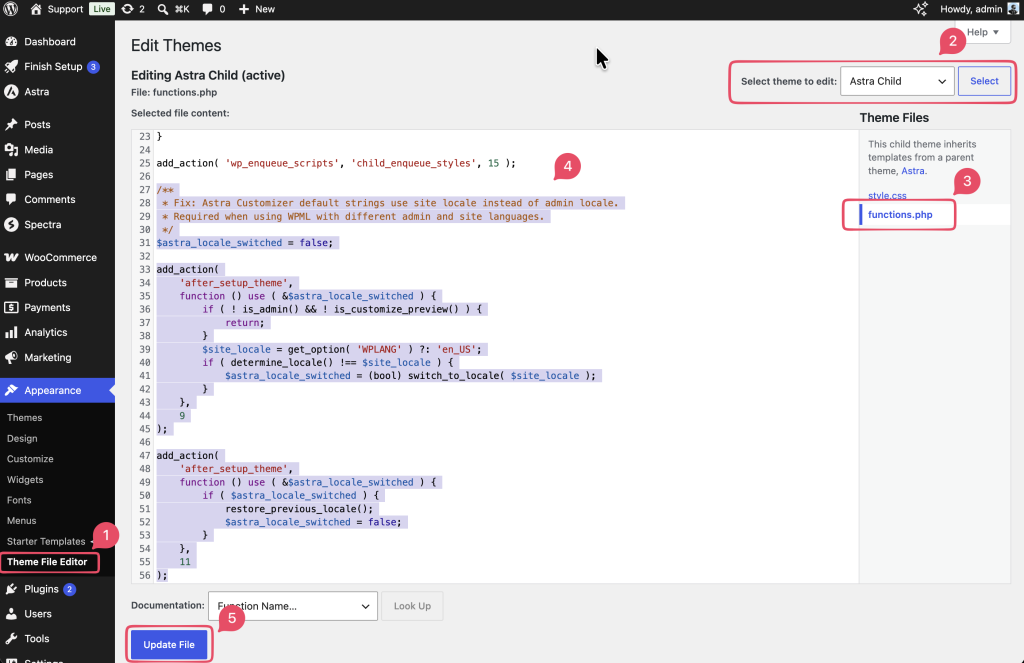
Step 2 — Verify the Fix
- Go to Appearance > Customize.
- Navigate to a section that contains text strings (for example, Header >Button).
- Update a text string and click Publish.
- Visit the frontend of your site and confirm the text displays in the correct language.
Expected Outcome
After adding the snippet, text strings saved in the Customizer will display in the site’s frontend language, regardless of the language set for the WordPress admin.
Important Notes
- The snippet must remain in place permanently. Removing it will cause the issue to return.
- It is safe to leave in your child theme long-term. The
is_admin() || is_customize_preview()guard ensures it only runs in the admin and Customizer, never on frontend pages. - This fix covers all Astra Customizer strings, including any added in future Astra updates, without needing to modify the snippet.
- If you manage multiple sites with the same WPML + language setup, the snippet needs to be added to each site’s child theme individually.
Still Not Resolved?
If the issue persists after adding the snippet, reach out via the Astra Support Portal with the following details:
- WordPress version
- Astra version
- WPML version
- Admin language and site frontend language settings
- A screen recording showing the exact steps that trigger the issue
Related Docs
We don't respond to the article feedback, we use it to improve our support content.